Lets start Smart Blogs to increase your traffic on your Google Adsense

Showing posts with label Hardware repair. Show all posts

Sunday, 25 September 2011

Self Test Printer without driver

How to Self Test Printer

If you often get servisan printer and your print is often difficult to test because they have to install any drivers on your computer, you may need to try this trick. Here is how to print directly from the printer without a test via computer. Epson Printer Self Test Method: Epson Printer type: C series: C41, C42, C43, C45, C58, C61, C62, C63, C65, C67, C79, C85, C86, C87, etc. R series: R210, R230, R270, etc. • Prepare a paper in the printer unit. • Press and hold the paper / resume and then press the power button Epson Printer type: CX Series: CX 3500, CX 3600, CX3700, CX 5100, CX CX 4900, CX 5900, etc • Prepare a paper in the printer unit. • Press and hold power button and press the ink / ink until the power indicator light flashes and then release both buttons 1x TSB.
How to test print directly from the printer Canon IP1200, IP1300, IP1600, IP1700, iP1880, iP1980, etc.: 1. Turn on the printer. 2. Tap-tap reset button 4x - 5x quickly, not to less. 3. And Canon printers you will begin to run a test print. Prepare the paper first so do not forget ..... Self Test for Canon Multifunction Printer can directly pass the copy button on the printer. How to test print directly from your HP printer 2566: 1. Turn on the printer. 2. Press the power button and hold it not in the release. (If released to die ...) 3. Then press the arrow keys 4x (three-four times) and then power on button is released. and your HP printer will begin to run a test print. Prepare the paper first so do not forget .....
How to test print directly from your HP printer 3325, 3535, 3744, 3920, 3940, 2466: 1. Turn on the printer. 2. Press the power button and hold it not in the release. (If released to die ...) 3. Then open the lid cover of the printer (printer cover) 3x-4x (three-four times the open lid), do not get less, and the last condition to close, and then power on button is released. and your HP printer will begin to run a test print.
 
Read More »

How to service hardisk seagate

How to service hardisk  seagate

Actually We have seen some cases, the Seagate hard drive that short-circuit. Conslieting on this hard drive power supply also led to death or to protectionism and the computer can not even turned on. Perhaps you have or are experiencing this, you short-circuit the seagate hard drive, but more data is stored in the disk itself. How can a short-circuit seagate harddisk service?

Below we will try to share about how to service the short-circuit seagate hard drive.

Preparation Equipment:
  1. Star screwdriver: to open the board hard drive screws.
  2. Multitester: to check the short-circuit diode components.
  3. Solder and Tin / tenol: who is used to replace damaged components.
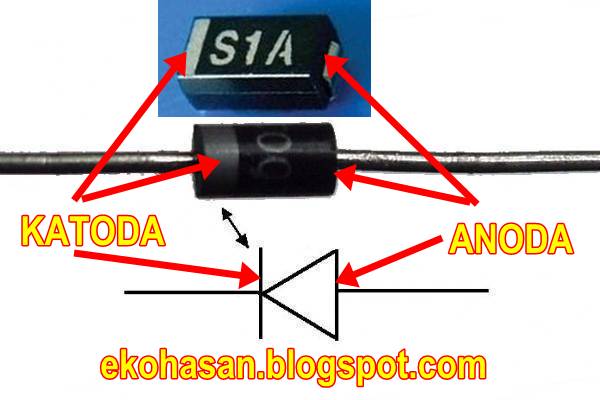
  4. Spare parts diode 1A - 2A: buy electronics stores.
 How to Service a short-circuit Seagate Harddisk:
  • For short-circuit that lies the hard drive components on the inside, you need to open the screw at boardnya.

  • To drive short-circuit that component has been seen directly, you do not need to open boardnya.
  • Short-circuit on the Seagate hard drive is often the case in the voltage of 12 volts DIODE his safety. 12 voltnya voltage power supply cables are colored yellow. While the red wire voltage is 5 volts. Sometimes the security DIODE 5 volts also had a short-circuit, but rarely.


  • DIODE safety checks voltnya voltage 12. DIODE also a safety check 5 voltnya. see in the picture. How to check a diode can be read here. A good way of soldering can be found here
  • Immediately replace the hard drive that short-circuit diode diodes tersebut.dengan 1-2 Ampere, purchased at many electronics stores. Note the position of the anode and cathode.

  • Harddisk ready to trial.
We can not guarantee it works 100%, because it could be the chipset disk has joined a short-circuit / broken. But from our experience, many brands, especially hard drives Seagate has come back to normal again.

Good luck
Read More »
Nano smart blog found result for your search: